


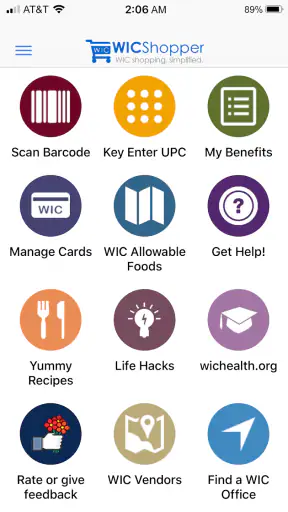
WIC shopping can be stressful when you are trying to remember eligible items, keep track of benefits, and make decisions in a busy store. I found WICShopper most useful as a practical companion for those moments rather than as a general grocery-shopping app. It is a free shopping app from JPMA, Inc., designed around the needs of WIC participants, and its strong 4.8 average from around 113 thousand ratings suggests that many users find it genuinely helpful.
What makes it worth considering is the way it turns a vague question—“Can I buy this with my benefits?”—into something you can check while standing in front of a shelf. That does not remove every complication from WIC shopping, but it can reduce guesswork. I would recommend it especially to people who are new to WIC, caregivers shopping for a household, and anyone who has experienced the frustration of reaching the checkout and discovering that an item is not covered.
How I Use WICShopper During a Normal Shopping Trip
Start with the app before entering the store
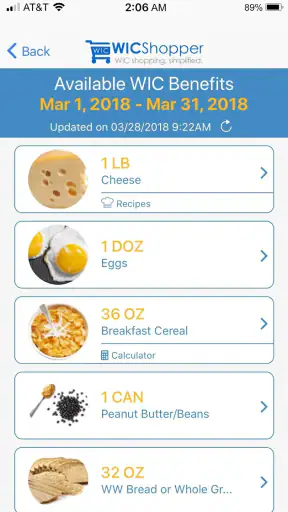
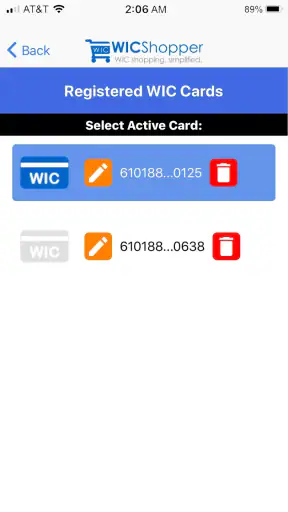
My preferred workflow begins before I put anything in the cart. I open the app, make sure the relevant participant information is ready, and use the available account and benefit tools to refresh my understanding of what I am shopping for. This small pause matters because WIC purchases are easier when I begin with a plan instead of scanning random products and hoping they qualify.
I then make a short list based on the foods I actually need. The list does not have to be elaborate. A few categories and product ideas are enough to keep the trip focused. The app is most helpful when I treat it as a decision tool: I identify an item, check it, and then decide whether it belongs in the cart. I do not use it as a replacement for reading the package or paying attention to the store shelf.
For a parent shopping after work, a realistic routine might be checking the account at home, noting the benefits that need to be used soon, and verifying unfamiliar products in the aisle. If a cereal or milk package looks similar to one bought previously, I still check it when the size, flavor, or packaging has changed. That habit prevents the common mistake of assuming that two nearly identical products are treated the same way.
Use product checking as a confirmation step
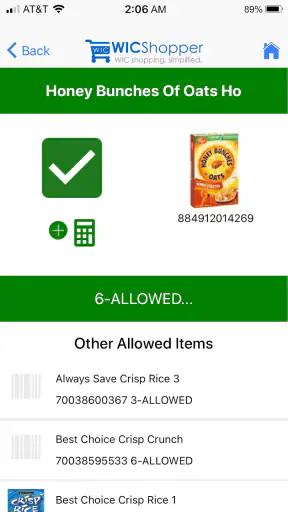
The product-checking function is the part I would use most often in the store. I like the idea of scanning or searching an item instead of relying only on memory, particularly when shopping for several people with different dietary needs. It is quicker than asking a cashier to test every uncertain product, and it gives me a chance to change my choice before reaching the register.
There is an important distinction, though: a result in the app should be treated as useful guidance, not as permission to ignore the checkout process. Store inventory, package size, benefit rules, and local program details can all affect what happens at payment. I still compare the result with the exact product in my hand, including the size and variation. That extra check is one of the best ways to avoid a preventable surprise.
I also find it useful to check before placing an item in the cart rather than waiting until the end. When a product is unsuitable, I can immediately look for another option in the same section. This is less frustrating than building a full cart and then having to separate products at the register.
Keep the account view in the shopping routine
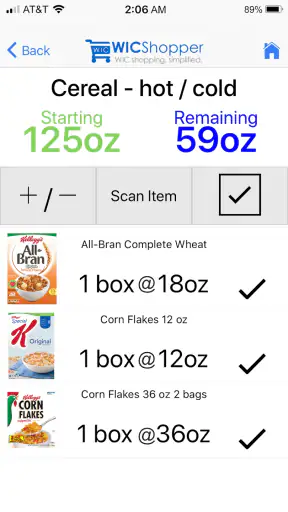
The account-related parts of the app are valuable because they connect the shopping list with the benefits available to the household. Instead of treating the app as a barcode tool only, I use it to keep the trip grounded in what I can reasonably purchase. That helps with planning quantities and reduces the temptation to choose items that look eligible but do not fit the current balance or benefit category.
I would not open the app for every single familiar item. That would make shopping unnecessarily slow. My faster approach is to check products that are new, confusing, or close to another product with different eligibility. For regular staples that I have already confirmed, I move on unless the packaging or size has changed.
What first-time users should prepare
New users should expect a little setup rather than assuming the app will be useful immediately after installation. WIC programs can involve participant information and local details, so I would complete the app’s setup carefully and keep the relevant card or account information available. Rushing through this stage can make later checks confusing.
I would also take the first shopping trip slowly. Test the app with a few products whose eligibility is clear, then try it with one or two items that are less obvious. This gives you a feel for how the results fit your local shopping habits. After that, the process becomes much more natural.
Settings that deserve a quick review
There may be no reason to change every setting, but I would still review the parts connected to account details, notifications, and the participant profile. The goal is not to customize the app for its own sake. It is to make sure the information used during shopping is current and that the app is not relying on an old household setup.
If more than one person in the family shops, I would agree on one simple routine. For example, one person can update the account information while both shoppers use the product-checking tools in the store. This avoids a situation where each person has a different understanding of the available benefits.
Notifications are also worth considering. Helpful reminders can keep the app present when you need it, but too many alerts can make people ignore all of them. I prefer enabling only the notices that support an actual shopping habit. If an alert does not change what I do in the store, it probably does not need to interrupt me.
Another practical setting-related check is the phone itself. I make sure the app is updated and that my device can connect when I shop. WICShopper currently appears as version 5.2.27 and requires Android 8.0 or later, so people using an older Android phone should confirm compatibility before planning around it. The app is also available as a free shopping tool, which makes trying it low-risk for eligible users.
Build a repeatable product-checking habit
The most effective users will not scan aimlessly. They will create a repeatable pattern: identify the food category, choose a likely product, check the exact package, and place it in the cart only after the result makes sense. This sounds simple, but it is more reliable than scanning after shopping has already become chaotic.
I find that this habit works particularly well for shelf-stable foods with many similar varieties. A package may have several flavors, sizes, or formulations, and the visual difference can be easy to miss. Checking the exact item before buying saves time later. It also teaches me which products are dependable choices for future trips.
Over time, I would keep a small personal mental shortlist of products that have worked consistently. I would not assume that the shortlist is permanent, because benefits and product packaging can change, but it makes routine shopping faster. The app handles the uncertain cases while memory handles the familiar ones.
Use the app to reduce checkout friction
One of the less obvious benefits is emotional rather than technical. When I check questionable products before joining the checkout line, I feel more prepared. That matters when shopping with children, managing a tight schedule, or trying to avoid holding up other customers. The app cannot guarantee that every transaction will be smooth, but it can move many decisions away from the most stressful part of the trip.
I would still separate WIC items from other groceries in the cart when possible. That makes it easier to notice if a product has not been checked and helps me understand the receipt afterward. It is a simple physical habit that complements the app instead of asking the app to do everything.
Where the app is especially strong
WICShopper is strongest when the problem is uncertainty. It gives WIC participants a focused way to inspect products and organize their shopping around program benefits. A general grocery app might offer lists, coupons, or price comparisons, but those features do not answer the same question. WICShopper is more specialized, and that specialization is exactly why it can be more useful in a WIC aisle.
It is also helpful for households where the person doing the shopping is not the person who normally manages WIC information. A partner, grandparent, or other caregiver can follow a clearer process instead of relying entirely on verbal instructions. I would still make sure that person understands the difference between checking an item and completing a transaction, but the app gives them a practical reference point.
Where another shopping app may be better
I would not choose WICShopper as my only grocery-planning app if my main goal were comparing prices, building a detailed meal plan, collecting store coupons, or organizing a broad household budget. Its value is tied to WIC shopping, not to every part of grocery management. A general shopping list app may be better for planning recipes and tracking non-WIC purchases.
The best combination for many households is simple: use a general list for meals and household supplies, then use WICShopper for eligibility and benefit-related checks. That division keeps each tool focused. Trying to make one app handle every shopping task usually creates more work, not less.
Limits I noticed in the advanced workflow
The app does not remove the need for judgment. A scan can be useful, but I still need to confirm that I selected the correct package and that the item fits the shopping situation. If the phone has poor connectivity, the screen is hard to read in bright store lighting, or the product barcode is damaged, the digital workflow becomes less convenient. I would always keep a backup plan: know the store layout, carry the relevant card or account information, and be ready to ask staff for help.
Another limitation is that new users may expect a definitive answer for every possible product. In practice, shopping rules can be detailed, and similar products may be treated differently. The app helps narrow the decision, but it does not replace attention to the package, the benefit balance, or the checkout result. That is not a reason to avoid it; it is a reason to use it intelligently.
I also would not rely on it as the sole record of household planning. If several people share shopping duties, keep a separate understanding of what is needed and who is responsible for the next trip. The app can support that system, but a family routine should not collapse if one person’s phone is unavailable.
Who should install it
I think WIC participants who shop in person should give it a serious try. It is particularly suitable for first-time participants, people who regularly encounter unfamiliar brands, and families that want a clearer way to check products before reaching the register. Its Everyone age rating also makes it approachable for households where another adult may occasionally handle the shopping.
The app has been available since January 11, 2013, and has grown to over one million installs. That level of adoption, together with its large number of ratings, makes it feel like an established tool rather than a temporary experiment. I would still judge it by how well it fits my local shopping routine, but its long presence and focused purpose are reassuring.
Who may want a different approach
Someone who rarely shops for WIC foods, already knows every product they buy, and mainly wants coupons or price tracking may not gain much from making this app central to their routine. Likewise, shoppers who prefer managing everything on paper may find the setup and phone checks unnecessary. The app is most valuable when uncertainty and changing shopping responsibilities are part of everyday life.
People using an older Android device should check that it meets the Android 8.0 requirement. Anyone uncomfortable with scanning or account setup may need a little patience during the first use. Those are manageable obstacles, but they are worth considering before depending on the app during a rushed trip.
My final assessment after making it part of the routine
My opinion is that WICShopper succeeds because it focuses on a real, specific problem: making WIC shopping easier to verify and manage. I would not describe it as a complete grocery assistant, and I would not use it carelessly as a guarantee that checkout will accept every item. Used with the right expectations, however, it can make shopping more organized, especially when I check uncertain products early and keep my account information current.
The strongest workflow is not complicated. I prepare before leaving, review the relevant benefits, check unfamiliar products in the aisle, and keep WIC items organized in the cart. Experienced users can make that process faster by relying on confirmed staples while reserving checks for products with confusing packaging or changing sizes. That balance is more efficient than scanning everything and safer than trusting memory alone.
My recommendation is straightforward: if you participate in WIC and want a focused tool for product checks and shopping preparation, WICShopper is worth installing. It is free, its purpose is clear, and its high user rating reflects strong practical appeal. Just treat it as a helpful guide within a larger routine—not as a substitute for checking the exact product, understanding your benefits, and paying attention at checkout.
For me, that makes WICShopper a useful everyday companion rather than a flashy shopping app. It earns its place on the phone by helping with the moments that usually cause the most doubt, while leaving the final decision where it belongs: with the shopper, the current benefit information, and the actual item in the cart.


